
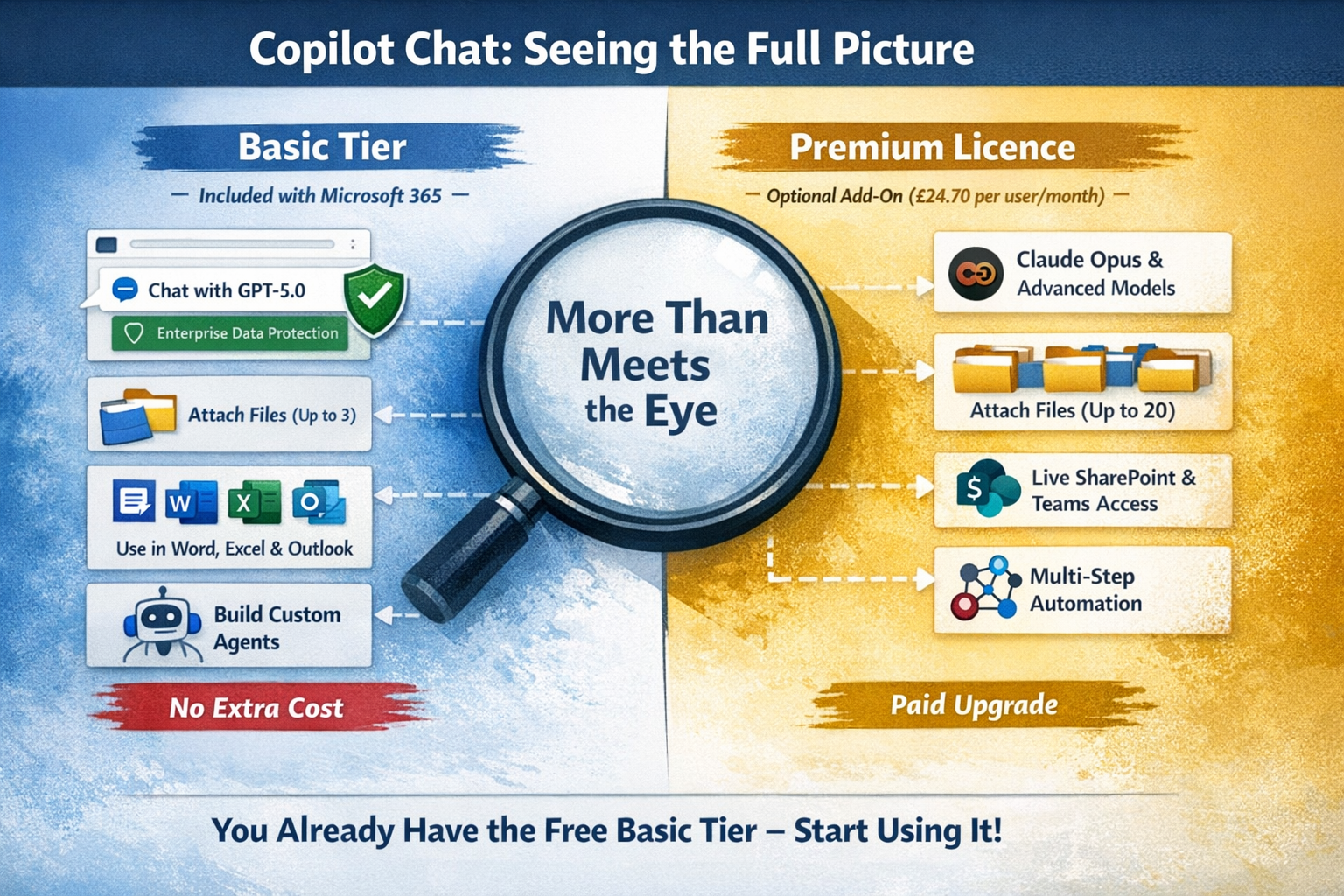

Most of the Copilot conversations I have with clients start with the same misunderstanding. They think Copilot is the £23.10 add-on. They are not wrong, but they are only seeing half the picture.
If your organisation has Microsoft 365, you already have Copilot Chat. That is the free tier (now called Basic). Around four to five hundred million people have access to it. Most have never opened it. Or they opened it once, asked it to write a poem and closed it again.
This post is the counterpart to You Already Have Copilot: Here's How to Get More From It. Same idea, opposite angle. Here are the mistakes I see most often, what to do instead and what you can genuinely achieve before paying for a Premium licence.
Mistake 1: Assuming you need a Premium licence to start
Copilot Chat on the Basic tier (the free version that ships with M365) is more capable than most people realise. With it you can:
- Chat with web-grounded answers powered by the GPT-5 model family, with newer GPT-5 models available to select from the model picker, all backed by Enterprise Data Protection so your prompts stay inside your tenant
- Attach up to three files per prompt from your machine, OneDrive or SharePoint so Copilot can reason over your actual work
- Inside Outlook, summarise the email or thread you are reading, search across your inbox, draft replies and create calendar invites from a prompt
- Inside Excel and Word, use Chat Only mode to talk about the document or Edit with Copilot to add pivot tables, charts, formulas and rewrites directly into the file
- Generate brand new Word, Excel and PowerPoint documents from prompts
- Build agents (subject to IT permissions) that automate repetitive prompts
- Personalise it with custom instructions and saved memories
What Premium actually adds is dynamic grounding across your tenant: instead of attaching a file each time, Copilot can pull live from your SharePoint, OneDrive and Teams channels on demand. It also unlocks Anthropic's Claude models (including Opus) inside Copilot Chat, raises the file limit per prompt from three to twenty and adds Copilot Cowork's agentic multi-step features.
One caveat since 15 April 2026: in organisations with more than 2,000 Microsoft 365 seats, unlicensed users no longer get Copilot inside Word, Excel, PowerPoint and OneNote. Copilot Chat itself, in the Microsoft 365 Copilot app and Outlook, is unaffected. Smaller organisations keep the in-app experience under standard access.
For most teams Basic is more than enough to start getting value. Don't pay for Premium until you have actually felt the ceiling of the free tier.
Mistake 2: Treating it like Google
The number one prompting mistake is the one-line search query. Write a blog post about Copilot. Summarise this. Make a slide deck.
You will get something back. It will be generic. You will conclude that Copilot is not very good.
Good prompts give Copilot four things: context, goal, source and expectation. Tell it why you need this, what response you want back, what information it should use (a file, a website, your own notes) and how the answer should be shaped. That single shift produces a measurably different result. It is the framework we teach in the first hour of every Copilot Essentials session and it is consistently the thing people say changed their thinking.
If writing prompts still feels awkward, ask Copilot to write the prompt for you. Something like "I need a prompt that will make Copilot draft an email about a delivery delay to a customer, can you create that prompt for me?" returns a properly structured prompt you can paste into a new chat. It is the technique I use most often myself and one of the most useful habits to build.
Mistake 3: Ignoring the file picker
In Copilot Chat there is a + button that lets you attach up to three files from your machine, OneDrive or SharePoint per prompt. Almost nobody uses it.
If you are writing a proposal, attach the brief. If you are comparing two suppliers, attach both quotes. If you are summarising a meeting, attach the notes. Copilot reasons over what you give it. Without source material it is guessing.
This is the single biggest quality lever in Copilot Chat and it works on the free Basic tier.
Mistake 4: Pasting work content into consumer AI
This one I see weekly. Someone has a Microsoft 365 subscription and a working Copilot Chat sat in their browser, and they are still pasting client emails into the free version of ChatGPT or Gemini on a personal account.
Consumer AI tools on free tiers do not have Enterprise Data Protection. Your prompts can be used for training. Your data leaves the tenant. For a regulated business that is a serious problem and one most IT teams have not yet caught up with.
Copilot Chat Basic gives you the GPT-5 model family (with newer GPT-5.x models available in the model picker), has Enterprise Data Protection, respects your tenant boundary and is already included in your M365 subscription. You can verify the protection yourself: a green shield icon appears in the top corner of Copilot when Enterprise Data Protection is active. No green shield, no protection.
There is no reason to be pasting work into a personal ChatGPT account. Use the tool your employer already pays for.
Mistake 5: Never building an agent
If you are typing the same instructions into Copilot more than twice a week, you should be building an agent.
An agent in Copilot Chat is a small, persistent version of Copilot that already knows your instructions, your tone, your reference material and what good looks like. It lives on the left rail and runs the same way every time.
A few I have built recently for clients:
- A proposal writer agent that knows the firm's voice, pricing structure and standard service descriptions
- An email triage agent that drafts replies in a specific tone for specific senders
- A meeting prep agent that pulls together notes from past interactions before a call
You do not need Copilot Studio for any of these. They are built inside Copilot Chat in about ten minutes. If you want to go further and build agents that connect to your line-of-business systems, that is what our Copilot Agents course covers.
Mistake 6: Skipping personalisation
Click the three dots, top right of Copilot Chat. Open settings. There is a custom instructions box and a memory section. Almost nobody fills them in.
Custom instructions are where you tell Copilot how you want it to behave by default. Respond in British English. Be direct, no preamble. Always offer the opposing view at the end. Default to bullet points unless I ask for prose. This applies to every chat from now on.
Memories are where Copilot stores things it should remember about you across sessions. Your role, your projects, your style preferences, the clients you work with.
Five minutes here saves an hour a week.
Mistake 7: One bad result and you give up
This is the one I see most. Someone tries Copilot in their first week, asks for something, gets a mediocre answer, decides AI is overhyped and never goes back.
Copilot is a skill, not a switch. Like Excel, the people who get value from it are the ones who keep using it long enough to learn what it is good at and what it is not. The first three months are the worst. After that something clicks.
Treat Copilot like an apprentice rather than a replacement. It can do a surprising amount, but it needs you to check its work, guide its direction and call out when it is wrong. The teams I see succeeding are the ones who treat the first quarter as a learning phase rather than a productivity phase. Set the expectation. Stay with it. This is also why train and leave doesn't work for AI rollouts.
Where to start
If you do not have a Premium licence yet, here is what I would do in order:
- Open m365copilot.com or the Copilot icon in Outlook and check for the green shield
- Fill in custom instructions and memories (five minutes)
- Ask Copilot to write a prompt for one of your weekly tasks, then use it
- Pick one repetitive task. Just one. Build an agent for it
- Spend a week using only Copilot Chat for first drafts. Email replies, document outlines, slide structures
- At the end of the week, write down what worked and what did not
If you do all of that and find yourself constantly wanting Copilot to pull live from your SharePoint without you attaching files, wanting Claude Opus or hitting the three-file ceiling, then you are ready for Premium. When you get there, Copilot Premium Unlocked is the course we built for that step.
The mistake is not the tool. The mistake is assuming you need to spend more money before you have used what you already have.

Ready to get more from Microsoft 365?
Book a free consultation to talk through where you are and where you want to be. No pressure, no hard sell. Just an honest conversation.

