

Update, 25 September 2026: Copilot's model line-up has moved on since this post was written. GPT-6 Sol and Claude Opus 5.5 are now rolling out across Copilot, with GPT-6 Astra in Cowork and Copilot Studio. For the current picture, see our guide to the AI models in Microsoft 365 Copilot.
GPT-5.3 Is Here. But Is It Actually Better?
On 3 March 2026, Microsoft announced the rollout of OpenAI's GPT-5.3 Instant in Microsoft 365 Copilot and Copilot Studio. The marketing claims are familiar: more accurate responses, stronger writing, more direct answers and fewer disclaimers.
Rather than taking the press release at face value, I ran the same prompts through both Auto mode and the new GPT-5.3 model to see whether the upgrade makes a real difference to everyday work.
The short answer: it depends on the task. And that matters more than most people realise.
The Test Setup
I chose two prompts that test fundamentally different skills. The first asked Copilot to turn messy meeting notes into a professional follow-up email. This tests writing quality, tone and the ability to pick up on context clues within unstructured input. The second asked it to organise a chaotic brain dump into a 90-minute board meeting agenda. This tests reasoning, prioritisation and structural thinking.
Both prompts used realistic, messy input rather than clean example text. That is how people actually use Copilot at work, and it is where differences between models tend to show up.
Test 1: Meeting Notes to Follow-Up Email
This one surprised me. Auto mode won.
Auto produced an email that read like something you would actually send. It correctly identified Sarah as the main contact from the meeting notes and addressed the email to her directly. The tone was warm but professional, the kind of email that maintains a client relationship rather than just ticking a box.
GPT-5.3 took a more structured approach, but the result felt clinical. It used a "[Client Name]" placeholder instead of picking up on the name from the notes. It included phrases like "administrative overhead" which nobody uses in a real client email. The next steps section read like a status update rather than a natural follow-up, and the line "I will include her in future correspondence" was stiff enough to make you wince.
Where Auto acknowledged the Copilot training request casually without overcommitting, 5.3 turned it into a formal agenda item. The email would have worked, but it would have needed editing before you could actually send it.
Microsoft's announcement claims GPT-5.3 delivers "stronger and more expressive writing." Based on this test, that claim does not hold up. Auto wrote a better email.
Test 2: Brain Dump to Board Meeting Agenda
This is where GPT-5.3 earned its keep.
Given the same chaotic input, 5.3 made smarter decisions about what belonged in the meeting and what should be parked for later. It correctly flagged the pricing restructure discussion as something that needed its own separate session, with a clear explanation of why it did not belong in this agenda. That is genuinely useful judgment.
The decision summary table at the end was a standout feature. Rather than just listing agenda items, 5.3 provided a structured table showing what was decided, what was deferred and why. If you have ever left a board meeting unsure about what was actually agreed, you will appreciate that.
Auto, by contrast, went overboard. It produced a pre-read pack, a chair's script offer, follow-up questions, sub-timings within each section and what amounted to a three-page project plan. I asked for a 90-minute agenda. Auto tried to be helpful but created more work rather than less.
What OpenAI Claims vs What I Found
Microsoft's announcement highlights three improvements: more reliably accurate responses, stronger writing and more direct answers that avoid unnecessary disclaimers.
My testing partially supports and partially contradicts these claims. The structured task showed clear improvements in reasoning and prioritisation. The writing task showed Auto producing more natural, human-sounding output. It is worth noting that OpenAI's claims are based on their own ChatGPT implementation. Copilot's version runs through Microsoft's infrastructure with additional enterprise features, and the behaviour can differ.
The announcement also highlights better web synthesis, describing how Copilot now delivers clearer responses by combining online sources with its own reasoning. I did not specifically test web-grounded queries, but the improvement in the agenda task suggests the reasoning upgrades are genuine even without web content in the mix.
Where to Find It and How Models Work in Copilot
GPT-5.3 Instant is rolling out now to Microsoft 365 Copilot users with priority access and Copilot Chat users with standard access. For agent builders, it is available in Copilot Studio early release cycle environments as GPT-5.3 Chat.
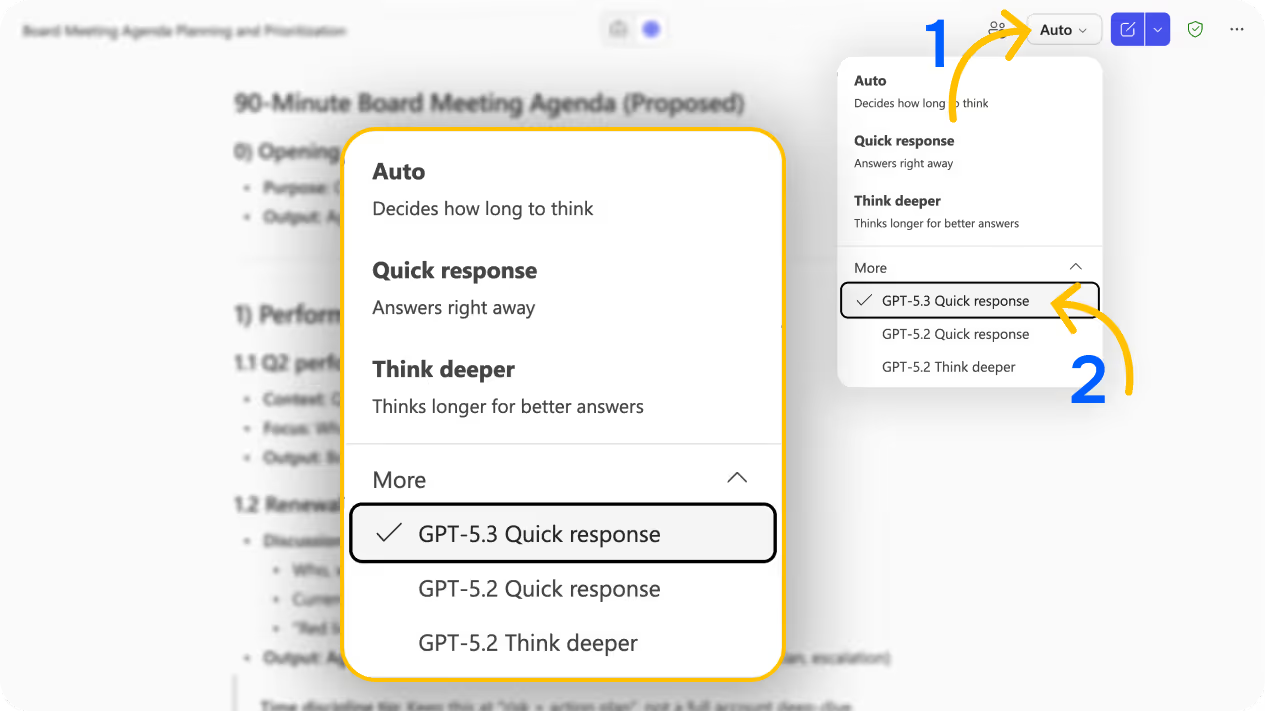
To try it, open Copilot Chat and look at the model selector in the top right corner. Click on it and expand the "More" section. You will see GPT-5.3 Quick response alongside GPT-5.2 Quick response and GPT-5.2 Think deeper.
Understanding what Auto actually does is useful context here. When you leave Copilot on Auto, it decides which model to use based on the complexity of your prompt rather than always using the most powerful option available. This is partly a cost decision for Microsoft, as more capable models require more compute. That is also why the newer models like 5.2 and 5.3 are tucked away under "More" rather than being the default.
There is no published hard token limit, but Microsoft applies fair use rate limiting behind the scenes. If your whole team spent the day hammering Think Deeper for every message, you would likely hit throttling faster than if you stuck with Auto or Quick response. For most daily work, Auto handles things perfectly well. The manual model selection is there for when the task genuinely benefits from it.
Practical Advice for Your Team
Based on this testing, here is what I would recommend:
Do not assume newer means better for every task. GPT-5.3 handled the structured reasoning task more effectively, but Auto wrote a better email. The model that suits you depends on what you are asking it to do.
Test with your own real work. Generic prompts do not surface the differences that matter to your workflow. Feed Copilot the kind of messy, real-world input your team deals with daily and compare the outputs.
Think about the task type before switching models. Writing tasks that need warmth and natural language may still be better on Auto. Tasks that need prioritisation, structure or analytical thinking are worth trying on 5.3.
Most people can stay on Auto for 80% of their work. Only switch models when you notice the output is not quite right or when the task specifically demands better reasoning.
If your team needs help understanding when to use which model and how to get the most from Copilot, our Microsoft Copilot training covers exactly this.
Explore the full model selector while you are there. GPT-5.2 Quick response and GPT-5.2 Think deeper are also available, and each handles prompts differently. It is worth running the same prompt through multiple models on tasks that matter to you.
The Bigger Picture
GPT-5.3 is not a blanket upgrade that makes everything better. It is a more capable reasoning model that excels at structured, analytical tasks while potentially sacrificing some of the natural writing quality that Auto achieves. That nuance gets lost in the marketing.
For organisations using Microsoft 365 Copilot, the real value here is choice. You now have multiple models available for different scenarios, and understanding when to use which one is becoming a practical skill worth developing across your team. If you are still getting to grips with what your Copilot licence actually includes, our Basic vs Premium comparison is a good starting point.
If you are rolling Copilot out across your organisation and want help getting your team up to speed on features like model selection, prompt engineering and practical AI workflows, get in touch. We work with businesses across the UK to make sure Copilot delivers real value rather than just sitting unused in the toolbar.

Ready to move from Copilot access to Copilot adoption?
Book a free consultation to talk through where your organisation is with Copilot and what the right next step looks like. No pressure, no hard sell. Just an honest conversation.

