
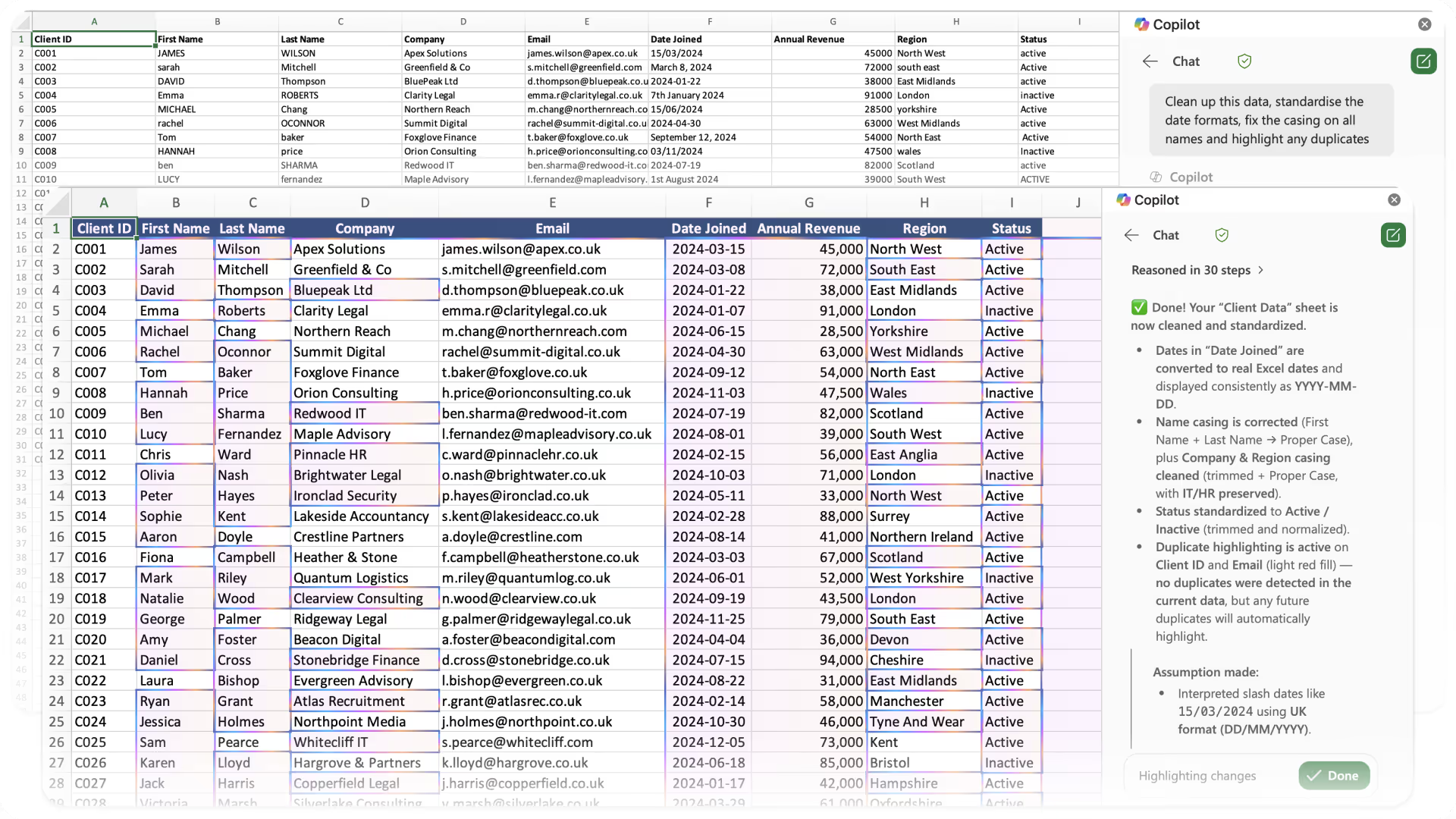

Microsoft has been quietly rolling out AI capabilities to unlicensed Microsoft 365 users since mid-2025. On 17 March 2026, a new Message Centre post (MC1253863) confirmed that on April 15, 2026, Copilot in Word, Excel and PowerPoint with advanced reasoning would become generally available for organisations with fewer than 2,000 Microsoft 365 seats. No Copilot license required. A second post published the same day (MC1253858) confirmed the opposite for larger organisations: from the same date, unlicensed users in tenants with more than 2,000 seats lose Copilot inside Word, Excel, PowerPoint and OneNote.
If you have been waiting to understand what the free tier actually includes, and what the paid Copilot license adds on top, this guide breaks it all down based on official Microsoft documentation and Message Centre posts.
What is M365 Copilot (Basic)?
M365 Copilot (Basic) is the label Microsoft applies from April 15, 2026 to the unlicensed in-app Copilot experience in organisations with fewer than 2,000 Microsoft 365 seats. The "Copilot Chat (Basic)" label has not gone away. It now describes unlicensed users in organisations with more than 2,000 seats, who keep Copilot Chat in the Microsoft 365 Copilot app and Outlook but lose Copilot inside Word, Excel, PowerPoint and OneNote. Every user on an eligible Microsoft 365 or Office 365 subscription gets one of these tiers at no additional cost.
Basic includes the Copilot Chat pane inside Word, Excel, PowerPoint, OneNote and Outlook. Users can select from reasoning models including GPT-5.4, GPT-5.5 and more. It is web-grounded, meaning responses draw on public web data. Copilot Chat can also reference the file you currently have open and any files you upload directly to the chat.
Usage is governed by standard access limits, which means availability may vary depending on service capacity. Licensed users get priority access to the same features.
What is M365 Copilot (Premium)?
M365 Copilot (Premium) is the label for the paid Copilot experience. It requires a separate Microsoft 365 Copilot license on top of your existing M365 subscription. This is priced at £23.10 per user per month (annual) for enterprise, or £16.10 per user per month (annual) on the Copilot Business plan for organisations with up to 300 users. Microsoft also now sells bundled plans that combine a Business base plan and Copilot in a single subscription, and is running a Copilot Business discount offer from 1 July to 30 September 2026. Base plan prices rose on 1 July 2026, so check the Microsoft 365 admin centre for your current combined figure.
Premium includes everything in Basic plus deep integration with your organisation's data through Microsoft Graph and Work IQ. That means Copilot can reason over your emails, files, meetings, Teams chats and calendar, not just the web and whatever file you have open.
Edit with Copilot (formerly Agent Mode)
One of the most significant features now available to Basic users is Edit with Copilot, previously marketed as "Agent Mode". Microsoft renamed it in early 2026 to make the feature more approachable for non-technical users.
Edit with Copilot lets the AI build a step-by-step plan, make changes directly to your document or spreadsheet and iterate until the result matches your intent. It is multi-step, hands-off editing. You can watch the reasoning steps in the Copilot pane as it works.
For Basic users, Edit with Copilot uses web data and referenced files. For Premium users, it also draws on organisational data. Premium users can also switch between OpenAI and Anthropic Claude models using the model selector.
Edit with Copilot has been rolling out to unlicensed users since January 2026 (MC1187671) and is expected to complete by the end of March 2026.
Word, Excel and PowerPoint Agents
Microsoft has also introduced dedicated Word, Excel and PowerPoint Agents that work within Copilot Chat. These agents allow users to create high-quality documents, spreadsheets and presentations directly from a chat prompt. They use several models including Anthropic's Claude to generate structured, detailed outputs.
These agents are available to both Basic and Premium users. However, there is an important prerequisite: your tenant admin must enable the Anthropic Claude connection in the Microsoft 365 admin centre. Without this, the agents will not appear. This was confirmed in MC1187671.
For Premium users, these agents can also be grounded in organisational data through Microsoft Graph. For Basic users, they use web data and referenced files only.
Feature Comparison: Basic vs Premium
AI Chat and Reasoning Models
Both Basic and Premium users get access to the Copilot Chat pane in Word, Excel, PowerPoint, OneNote and Outlook. Both get access to GPT-5.3, GPT-5.4 Think Deeper and the model selector. Both get web-grounded responses, image generation and file upload, though Premium users get priority access to all of these. File uploads are limited to 3 per message (512MB each) for Basic and 20 per message (512MB each) for Premium.
Data Grounding
This is the biggest difference between the two tiers. Basic users get AI grounded in web data, the file they have open and any files they upload or reference. Premium users get all of that plus grounding in organisational data through Microsoft Graph, including emails, SharePoint files, Teams chats, meetings and calendar events. Premium also includes Work IQ, which adds personalised context, memory and inference across sessions.
Deep In-App Integration
Basic users get the Copilot Chat pane and Edit with Copilot. Premium users get deeper in-app features that go beyond the chat panel, including drafting content inline in Word, contextual formula suggestions in Excel, creating full presentations in PowerPoint, meeting summaries in Teams and email drafting in Outlook.
Agents
Both tiers get access to the Word, Excel and PowerPoint Agents (subject to Anthropic being enabled). Both can use pay-as-you-go agents with an Azure subscription. Premium additionally includes the Researcher and Analyst reasoning agents, custom agents built with Copilot Studio and agents grounded in organisational data through SharePoint and Graph connectors.
Admin, Security and Governance
Both tiers operate under Microsoft's enterprise data protection. Neither tier uses your data to train models. Premium adds Copilot Analytics dashboards, the full Copilot Control System, SharePoint Advanced Management and comprehensive admin controls.
Key Dates
Mid-2025: Copilot Chat pane with reasoning models began rolling out in Word, Excel, PowerPoint, Outlook and OneNote for unlicensed users.
January 2026: Edit with Copilot (Agent Mode) and Word, Excel and PowerPoint Agents began rolling out to unlicensed users. Copilot Chat in Outlook expanded to reason over the full inbox, calendar and meetings (MC1187671). Anthropic onboarded as a Microsoft subprocessor.
March 2026: Edit with Copilot in Excel and Word confirmed rolling out across web, Windows and Mac.
April 15, 2026: Formal GA for Copilot in Word, Excel and PowerPoint with advanced reasoning in tenants under 2,000 seats, labelled "M365 Copilot (Basic)", with in-product upgrade nudges activated (MC1253863). Unlicensed users in tenants over 2,000 seats lose Copilot inside Word, Excel, PowerPoint and OneNote and keep Copilot Chat in the app and Outlook, labelled "Copilot Chat (Basic)" (MC1253858).
What About the Upgrade Nudges?
From April 15, Microsoft is also switching on in-product notifications encouraging Basic users to upgrade to a Copilot license. MC1253863 explicitly states that users will see these prompts as part of standard access. Admins can manage the notification experience through self-service purchase settings and license request configuration.
The Bottom Line
M365 Copilot (Basic) is a genuinely capable free tier. Advanced reasoning models, Edit with Copilot for multi-step editing and the Word, Excel and PowerPoint Agents represent a significant step forward for unlicensed users.
The paid Copilot license earns its value primarily through data grounding. The ability for Copilot to reason over your entire work environment, your emails, files, meetings, chats and calendar, is what transforms it from a useful chat tool into a genuine productivity assistant that understands your organisational context.
For organisations that have not yet invested in Copilot licenses, the Basic tier is effectively a free pilot. Let your teams build the habits, learn to prompt effectively and see the value for themselves. Our Copilot training is designed to help teams at every stage of the journey, whether they are starting with Basic or rolling out Premium. If the AI proves useful with just web data and the current file, imagine what it can do with access to your full organisational knowledge.
If you need help getting your team up to speed, our Copilot Essentials course is built for exactly this. Designed for businesses without the full Copilot license, it covers prompting, security and practical AI skills across M365 apps, now including Edit with Copilot. Get in touch to find out more.



Ready to get more from Microsoft 365?
Book a free consultation to talk through where you are and where you want to be. No pressure, no hard sell. Just an honest conversation.

